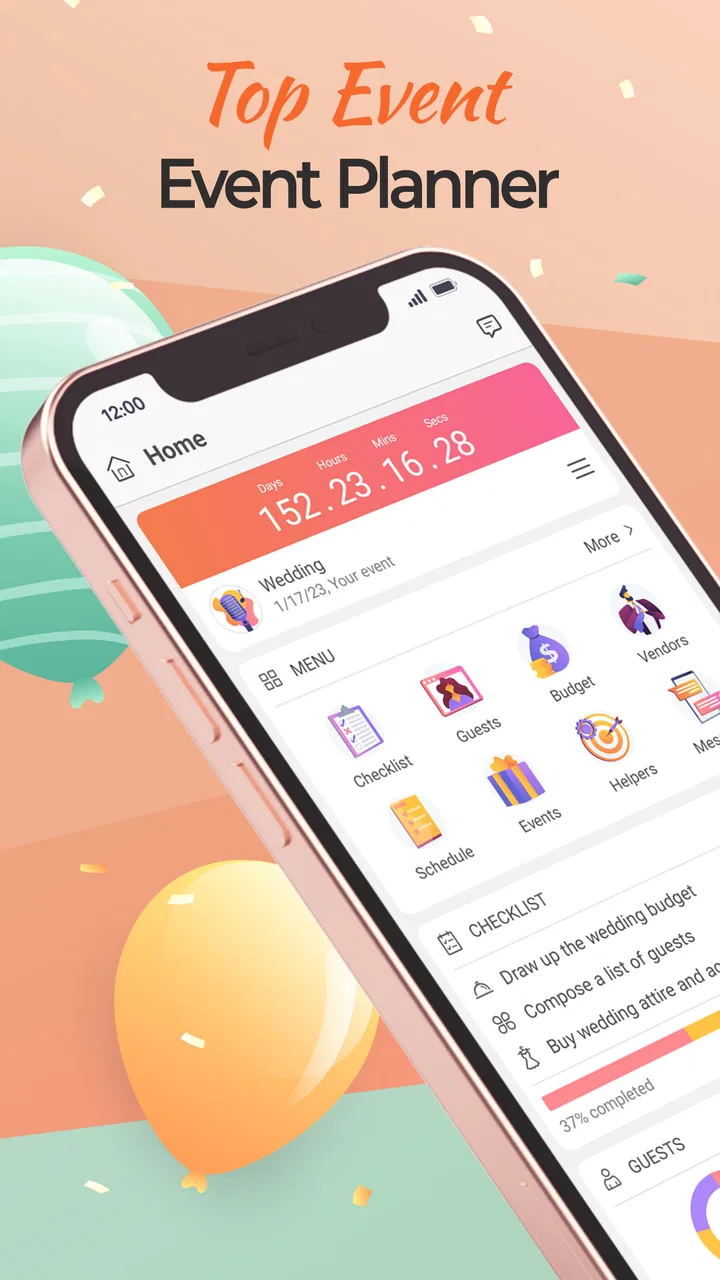
Event Planner: Birthday, Party
- 4.1
- Rating
- 100.00K
- Installs
- Free
- Price

 Analysis by App-foxy
I like event-planning apps most when they reduce the number of small decisions I have to keep in my head. That is the role Event Planner: Birthday, Party tries to fill: it gives birthdays, weddings, anniversaries, Christmas parties, and other celebrations one place to organize. I tested it with the mindset of someone planning a real gathering rather than browsing a template catalog, and my impression is practical rather than flashy. It can bring structure to a messy plan, especially when the alternative is a mixture of notes, chat messages, calendar entries, and memory.
The app is free to download, is rated for Everyone, and comes from Wedding Planner App. Its average rating is 4.2 from around 1.2 thousand ratings, while the listing shows over 100 thousand installs. Those figures suggest that it has found an audience beyond weddings, which makes sense because the same planning problems appear in a child’s birthday party, a family anniversary, or a holiday dinner. The current version is 4.10.44, and it runs on Android 8.0 or later.
What it feels like to use for a real event
My first useful test was a birthday gathering with several moving parts: a guest list, food choices, decorations, a venue decision, and a deadline for sending invitations. A normal notes app can hold all of that, but it does not naturally show what still needs attention. This planner is more suitable when I want the event to behave like a project, with separate pieces that I can review instead of one long paragraph of reminders.
You May Also Like

 Blood Strike: 2.5 Anniversary
Blood Strike’s Loadouts Turn Every Drop Into a Tactical Gamble
A close look at Blood Strike’s custom loadouts: how fast access to signature weapons reshapes its battle royale rhythm, rewards preparation, and narrows the gap between fights.

 Pandora - Music & Podcasts
Pandora’s Music Is Easy to Start, but Harder to Recover
Pandora’s strength is its low-effort path from a seed to a station. Its weak spot is how much confidence it asks you to place in connection, setup, and quiet recovery.

 8 Ball Pool
 Is Built on Rivalries, Rematches, and Routine
A close look at the rivalries, rematches, shared routines, and unanswered safety questions that turn a quick pool match into a persistent mobile community.

 Samsung Music
’s Quiet Strength Is Playing What You Already Own
Its reach comes less from spectacle than from dependable access to a personal library. That simplicity is both the app’s strongest retention engine and its ceiling.

 AccuWeather: Weather Radar
AccuWeather Review: A Quick, Clear Forecast for Everyday Decisions
For everyday plans, the best forecast is the one you can understand quickly. AccuWeather makes rain timing, radar, and local conditions easy to act on, with a few trade-offs.

 Hill Climb Racing
Why Hill Climb Racing Still Turns Crashes Into One More Run
A tiny car, a bumpy hill and one more upgrade: Hill Climb Racing keeps resurfacing because its simple chaos makes every near-miss feel personal.
More From Our News Desk



The strongest use case is not a tiny, spontaneous get-together. If I am inviting a few friends for coffee, opening a dedicated planner may be unnecessary. The app becomes more valuable when the event involves several people, purchases, deadlines, or changes. A birthday party with entertainment and food coordination benefits from a central plan; a large anniversary celebration benefits even more because forgotten details become expensive or embarrassing.
I also appreciate that the concept is broader than the name might suggest. The developer is Wedding Planner App, but the product is not limited to ceremonies. I could approach a Christmas party differently from a wedding, yet the underlying workflow remains similar: decide what has to happen, assign attention to it, and keep the event from becoming a last-minute scramble. That flexibility is one of the reasons I would consider it for family occasions rather than dismissing it as a wedding-only tool.
Turning a vague idea into manageable work
The most helpful habit is to create the event around decisions, not just activities. Instead of writing “plan birthday,” I would separate the work into guest planning, food, decorations, location, entertainment, and final checks. This makes the app more useful because each area can be revisited independently. It also exposes a common planning problem: a task may look complete while a related decision is still unresolved.
For example, choosing a venue does not automatically settle access time, seating, food storage, or decoration setup. I found it better to treat those as separate checks. This is a small but important distinction, and it is the kind of workflow improvement that a generic store description would not explain. The app is most effective when I use it to break down responsibilities rather than expecting it to plan the event for me.
Another practical approach is to use a “decision deadline” earlier than the actual event deadline. Food orders, guest confirmations, and room arrangements often need time to change. Keeping those decisions visible before the final week gives me room to react. The planner cannot remove uncertainty, but it can make uncertainty easier to see.
Who will get the most from it
I would recommend it to someone managing a celebration with many small purchases or several contributors. It suits a parent organizing a child’s party, a couple coordinating an anniversary, or a family member handling a holiday gathering while relatives offer help. It is also useful for people who prefer a visual planning space over a spreadsheet but still want more structure than a chat thread provides.
It can help a person who is not naturally organized, although only if that person is willing to maintain the plan. Creating an event once and never returning to it will not solve anything. The benefit comes from updating decisions as they change, removing finished items, and checking the plan at sensible intervals. I would use it after an initial brainstorming session, not as a replacement for thinking through the event.
On the other hand, I would skip it for a very simple occasion. If the event has one location, a short guest list, and no meaningful shopping or scheduling pressure, a calendar entry and a short note may be faster. I would also be cautious about choosing it as the only tool for a professional event team that needs advanced collaboration, formal approvals, detailed budgets, or specialized vendor management. The app’s appeal is its approachable event-planning focus, not the complexity of a full project-management platform.
Trust starts with what the app lets me control
When I review a planning app, I do not judge trust from its cheerful design or from the number of people who have installed it. I look at whether I can make deliberate choices about what I enter, how I organize it, and whether the app feels like a useful workspace rather than a place that pressures me into unnecessary decisions. In that respect, the important question is not simply whether the app can store event details, but whether I remain in charge of those details.
Event planning can involve sensitive information even when the occasion is ordinary. A guest list may reveal family relationships, a venue may identify where people will gather, and a budget may expose personal spending limits. I would therefore avoid entering information that is not needed for the planning task. For example, I would use a guest’s first name or a short identifier when that is enough, rather than adding extra personal details just because there is room to do so.
This is also why I would read the app’s permission prompts and privacy choices carefully during setup and whenever the app changes. A permission should have a clear reason connected to something I am trying to do. If a prompt appears without an obvious connection to my current task, I would pause instead of accepting automatically. That is not a criticism of this particular app; it is a sensible boundary for any application handling event information.
Handling information at sensitive planning moments
The most sensitive moment is usually the guest-list stage. It is tempting to copy a complete contact book into a planner, but I would not do that unless the app clearly explains why access is needed and gives me a comfortable alternative. Manually entering only the people relevant to the event takes more effort, yet it keeps the plan narrower and easier to review.
Location details deserve similar care. For a public venue, I might record the name and general area while keeping private access instructions elsewhere. For a home event, I would think twice before adding the full address to a planning workspace that does not need it. The same principle applies to children’s information, dietary details, and payment notes: include what helps organize the event, but avoid turning the planner into an unnecessary personal database.
Purchases are another point where I would be cautious. The app is free, but it includes in-app purchases ranging from $1.99 to $44.99 per item. I would review any purchase screen slowly, confirm what is being unlocked, and make sure I understand whether the feature is useful for my event before paying. A free starting point is welcome, but “free” should not mean tapping through upgrade prompts without checking the value.
For a family party, I would also decide in advance who actually needs access to planning information. Not every helper needs the guest list, budget, or venue details. If I share screenshots or copy information into a group chat, I would remove anything unrelated to that person’s task. The app can support organization, but privacy still depends on my habits outside the app.
Practical controls and the limits of convenience
The app’s value depends on keeping information current. That creates a trade-off: a central plan is clearer than scattered notes, but it becomes misleading if I forget to update it. I would schedule a short review after major decisions, such as confirming the venue or changing the menu. This is especially important when several people are helping, because an outdated plan can create more confusion than no plan at all.
I would also keep a separate record for anything that would be difficult to recover if lost, such as important booking references or payment confirmations. A planning app is excellent for organizing the work, but I would not assume it should be the only archive for every document connected with an event. Keeping essential confirmations in the original email or another trusted location gives me a backup and makes cancellation or rescheduling easier.
One limitation I noticed in this kind of workflow is that organization can become its own form of work. It is easy to spend time arranging categories and polishing a plan instead of making the decisions that matter. My solution is to create only the sections I will actually revisit. If a category does not help me decide, buy, contact, or verify something, I leave it out.
I also prefer a staged approach. First I capture the broad requirements, then I add concrete actions, and finally I use the app for checks close to the event. Trying to fill every detail immediately makes the plan feel heavy. Adding information as decisions become real keeps it useful and reduces the chance of storing guesses that later become confusing.
How it compares with familiar alternatives
Compared with a notes app, this planner offers a more event-centered way to think. Notes are quicker for an initial brain dump and may be better when I want to write a long message, but they make deadlines and unfinished areas harder to spot. I would use notes for inspiration and the planner for turning that inspiration into a sequence of actions.
A calendar remains better for fixed appointments. It tells me when the party, venue visit, or cake pickup happens, while the planner helps me remember the preparation around those appointments. I would not replace my calendar with it; I would use both when timing matters. The calendar answers “when,” while the event plan answers “what still needs doing?”
Spreadsheets are stronger when detailed cost comparisons, quantities, or shared editing are the main concern. They can be excellent for a large wedding budget or a complicated catering plan, but they require more setup and are less welcoming for someone who simply wants a clear celebration checklist. This app sits between a casual note and a formal spreadsheet, which is a sensible position for personal events.
Group chats are useful for quick questions and last-minute updates, but they are poor long-term records. Important decisions disappear under unrelated messages, and not everyone sees the same context. I would use chat to ask who can bring something, then record the final decision in the planner. That separation prevents the conversation from becoming the only source of truth.
For advanced teams, a dedicated project-management service may still be the better choice. Those tools are usually more suitable when work needs roles, approvals, detailed dependencies, or a formal audit trail. For a household celebration, however, that level of complexity can discourage participation. The right choice depends on whether the event needs professional control or simply dependable personal organization.
Small workflow choices that improve the experience
My first tip is to begin with the event’s non-negotiables. Write down the date range, approximate guest count, location decision, and any food or accessibility requirements before adding decorative ideas. This prevents attractive but secondary details from taking attention away from choices that affect the whole plan.
My second tip is to separate “waiting for an answer” from “I need to do this.” Those are different kinds of unfinished work. A vendor reply, a guest confirmation, and a shopping task all need follow-up, but the next action is different in each case. Keeping that distinction visible makes review sessions quicker and reduces the chance of assuming that silence means completion.
My third tip is to use the planner as a handoff tool. If someone else is responsible for drinks or decorations, make the request specific and agree on what completion means. “Handle drinks” is vague; “choose the drinks, confirm quantities, and bring them by the setup time” is much easier to verify. The app cannot enforce responsibility, but a precise plan makes delegation less awkward.
My fourth tip is to perform a privacy cleanup after the event. Remove or revise details that no longer serve a purpose, especially temporary guest notes, access instructions, or spending information. I would keep a simple record of what might be useful for a future celebration, but I would not preserve every personal detail indefinitely just because the event is finished.
What the audience response tells me
The app’s 4.2 average rating and roughly 1.2 thousand ratings give it a respectable public reception, while the 44 written reviews offer a smaller body of detailed feedback. I treat those figures as context rather than proof that it will suit every planning style. Event organization is personal: one user may want a guided structure, while another may find any dedicated planner slower than a familiar note or calendar.
The install base of more than 100 thousand suggests that the app is not an obscure experiment. That gives me some confidence that the product has practical appeal, but popularity does not answer questions about my own workflow. I would still spend a few minutes creating a sample event before committing important information or paying for an optional item.
The Everyone content rating makes it approachable for family use, including situations where a parent and child are discussing party ideas together. Even so, an age rating is not a substitute for careful sharing. I would keep adult-only information, payment details, and private guest notes away from any device or screen that children can freely access.
My cautious verdict
After using it as an event organizer rather than treating it as a decorative checklist, I see Event Planner: Birthday, Party as a practical middle ground. It is more focused than a general notes app, less demanding than a spreadsheet, and more orderly than relying on a group chat. Its best quality is that it encourages me to turn a celebration into manageable decisions without forcing me into a professional project-management system.
I would choose it for a birthday with several suppliers, a family anniversary that needs coordination, or a holiday party where different people are bringing different things. I would be less enthusiastic for a tiny gathering, a highly regulated professional event, or any situation where advanced collaboration and detailed financial tracking are essential. In those cases, a calendar, spreadsheet, or full project tool may be the better fit.
The trust question comes down to user discipline. I would keep the information minimal, review permission prompts instead of accepting them automatically, check purchase details carefully, and avoid treating the app as the sole archive for sensitive records. The best way to use this planner is as a controlled workspace, not a storage box for every detail of your personal life.
For a free event-planning app with a broad family-and-celebration focus, I think it is worth trying when an occasion has enough moving parts to justify a dedicated plan. It will not make decisions for me, and it cannot replace communication with guests or helpers. What it can do is give those decisions a clearer home, which is often exactly what I need when a simple party starts becoming a real project.
FAQs for Event Planner: Birthday, Party
01What features does Event Planner: Birthday, Party offer?
Event Planner: Birthday, Party provides a comprehensive suite of tools to simplify the planning process. Features include customizable event templates, guest list management, RSVP tracking, budget management, and vendor coordination. It also offers a selection of themes and decorations to personalize your event, making it perfect for birthdays, parties, and other celebrations.
02Is Event Planner: Birthday, Party user-friendly for beginners?
Yes, Event Planner: Birthday, Party is designed with a user-friendly interface that caters to both beginners and experienced planners. The app offers step-by-step guidance, intuitive navigation, and helpful tips to ensure even first-time users can plan events with ease. Its simple design makes it accessible for all users.
03Can I use the app offline or is an internet connection required?
Event Planner: Birthday, Party requires an internet connection for initial setup and access to certain features like vendor directories and online invitations. However, once the event details are downloaded, many planning tasks can be managed offline, allowing flexibility and convenience when internet access is not available.
04Does Event Planner: Birthday, Party support syncing across multiple devices?
Yes, the app supports syncing across multiple devices, ensuring that your event plans are accessible wherever you are. By logging into your account, you can seamlessly transition between your smartphone, tablet, and computer, keeping your planning consistent and up-to-date across all platforms.
05Is there customer support available if I encounter issues with the app?
Event Planner: Birthday, Party offers robust customer support to assist with any issues. Users can access a comprehensive FAQ section, live chat, and email support for quick resolutions. The support team is responsive and dedicated to ensuring a smooth planning experience, addressing technical challenges or inquiries promptly.
Pros
- User-friendly interface
- easy navigation.
- Customizable event templates available.
- Real-time updates for event changes.
- Integrates with calendar apps seamlessly.
- Guest management with RSVP tracking.
Cons
- Limited free version features.
- Occasional sync issues with calendars.
- In-app ads can be intrusive.
- No offline mode available.
- Limited customer support options.

Event Planner: Birthday, Party
Gallery